Google Maps Go
- 4.1
- Rating
- 1.00B
- Installs
- Free
- Price

 Analysis by App-foxy
Google Maps Go is a lightweight travel and local-search app from Google LLC, and I see it as a practical option for phones that struggle with the full Google Maps experience. It is free, rated for Everyone, and has become a familiar choice for people who want directions, traffic information, and nearby places without committing as much storage or processing power to a larger app. I tested it with the mindset of someone who needs to get around reliably rather than someone looking for every advanced mapping feature available.
My overall impression is that it works best as a focused navigation companion. It helps me look up an address, compare possible routes, check traffic before leaving, and find useful places around an unfamiliar area. The trade-off is that its streamlined approach can feel less complete than the standard Google Maps app. If you regularly depend on downloaded maps, elaborate trip planning, or deep place management, the lighter version may feel restrictive. If your priority is a simpler way to search and navigate, its reduced scope can actually be an advantage.
How Google Maps Go feels today
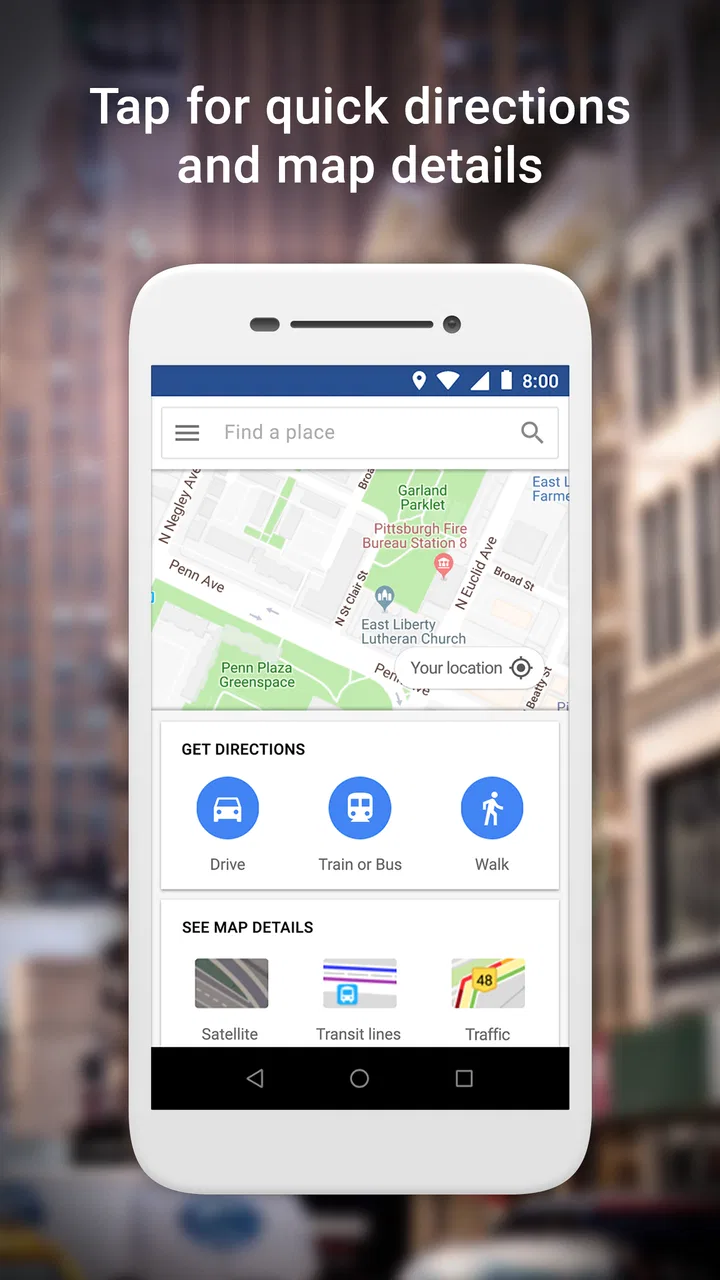
The first thing I noticed is that Google Maps Go is built around quick decisions. I can enter a destination, choose a travel mode, inspect the route, and start moving without wading through a crowded interface. That matters on an older Android phone, where a full-featured mapping app may take longer to open or feel heavy while switching between screens. The app does not try to replace every Google Maps tool in one place; instead, it concentrates on the everyday tasks most people perform when they are already on the move.
In-Depth Coverage of Google Maps Go
Its Travel & Local category is a good fit because the app connects several small tasks that normally happen during a journey. I can search for a pharmacy, restaurant, station, hotel, or other nearby destination, then use the result as the starting point for directions. That search-to-route flow is more useful than simply having a map on screen. When I am in an unfamiliar neighborhood, I usually do not know the street name I need, so finding a place first is often the most natural way to begin.
The app also benefits from the familiarity of Google’s mapping information. I do not have to learn a completely different search language or build a separate database of saved places just to find common destinations. For many users, that makes the switch to the lightweight version less intimidating. Google LLC has kept the central experience recognizable: search for somewhere, examine the route, and use the result to guide the next decision.
In ordinary use, I would describe the interface as functional rather than luxurious. It gives me the information I need, but I do not choose it for visual polish or extensive trip organization. That distinction is important. Someone who wants a map to support a quick errand may appreciate the restraint, while someone planning a long holiday with several stops may prefer a more comprehensive tool.
A realistic everyday trip
Imagine leaving work in an unfamiliar part of town and realizing that you need a grocery store before heading home. I can open Google Maps Go, search for nearby stores, inspect the results, and select one based on location and route. If traffic is building on the obvious road, the route view can help me decide whether the extra distance of another option is worthwhile. Once I choose, the app turns a vague request—“find groceries near me”—into a concrete destination.
That workflow is where the app makes the most sense. It is not only about drawing a line between two points. It combines local discovery with navigation, so I can search by what I need rather than by an address I already know. For visitors, delivery workers, students, and anyone who frequently changes neighborhoods, that can save more time than a collection of isolated map tools.
I also find it useful before leaving, not just during the journey. Checking traffic and directions in advance gives me a rough idea of how complicated the trip may be. I can compare the suggested route with the roads I already know and decide whether to leave earlier. This is a small habit, but it reduces the chance of discovering a major delay only after I am already driving or walking.
What the lightweight design changes
The main benefit of the Go approach is not that it makes navigation magically more accurate. Its value is that it places less emphasis on features many people never touch. On a modest phone, that can make the difference between an app I open immediately and one I avoid because it feels slow or crowded. I would especially consider it for a backup phone, a device with limited free space, or a user who only needs search, traffic, and directions.
There is a psychological benefit too. A simpler screen makes it easier to focus on the next action. I am less likely to spend time browsing unrelated recommendations when all I want is the fastest sensible route to a destination. That does not mean the app is distraction-free in every situation, but its narrower purpose helps keep the basic task visible.
The compromise becomes clearer when I move beyond basic journeys. A full mapping app generally feels better suited to people who want a rich record of places, detailed exploration, or many layers of travel information. Google Maps Go is more like a dependable front door to essential map functions. I can get in, find what I need, and leave, but I should not expect the same depth as the largest version of the service.
Evolution, practical trade-offs, and what users should expect
I look at the app’s history as context for its focused design, not as a promise about what it may become. Its lightweight roots help explain why it can suit a modest phone, while also setting expectations: I would choose it for straightforward local search and navigation, not on the assumption that it will match every capability of the full Maps app. That distinction leads naturally to the practical trade-offs users should weigh.
Where it fits in Google’s product history
Google Maps Go was released on February 6, 2018, during a period when lightweight mobile apps were especially important for devices with limited resources and less reliable connections. That background helps explain its character. It was not designed as a premium alternative with every possible tool; it was designed to make a familiar mapping service more approachable on less powerful hardware.
Today, its continued appeal comes from the same basic idea. Phones have improved, but not every user has a new device with abundant storage, and not every person wants a large app for occasional navigation. The app has passed one billion installs, which shows how widely the lightweight concept has traveled. I would not treat that figure as proof that it is the best choice for everyone, but it does show that the need for a simpler mapping route has remained substantial.
You May Also Like

 Hill Climb Racing
Why Hill Climb Racing Still Turns Crashes Into One More Run
A tiny car, a bumpy hill and one more upgrade: Hill Climb Racing keeps resurfacing because its simple chaos makes every near-miss feel personal.

 AliExpress - Shopping App
AliExpress Makes Global Shopping Feel Personal, but Shoppers Bear the Risk
AliExpress turns a global marketplace into a pocket-sized discovery engine. Its reach is useful, its shopping loop compelling, and its trade-offs easy to miss.

 Lords Mobile: Kingdom Wars
Lords Mobile Is a Kingdom-Building Routine, Not a Quick Match
A case-by-case verdict on the building, battles, device demands, and social commitments that make Lords Mobile rewarding for some players and exhausting for others.

 PDF Scanner app - TapScanner
TapScanner Makes Paperwork Easier to Capture, Check, and Share
TapScanner makes scanning with a phone feel less like a rescue operation and more like a dependable step in getting work done. Its capture tools are useful, though not flawless.

 Block Blast!
Block Blast! Shows How Much a Puzzle Game Can Leave Out
A quiet grid game shows why puzzle players increasingly value instant clarity, repeatable skill and low-pressure play—and where the genre still needs to catch up.

 Family Space
Family Space Review: A Shared Routine That Makes Family Life Easier
A parenting app earns its place not by adding more noise, but by making everyday coordination easier. Family Space gets that balance mostly right.
More From Our News Desk
View All News


The current evidence I can point to is the product’s established role, its free availability, and its broad adoption. I would separate that from predictions about future development. A lightweight app may evolve, but I would not choose it on the assumption that a particular advanced function will arrive later. The sensible decision is to judge it by the tasks it handles now.
How existing users are affected
For someone already using Google Maps Go, the biggest advantage is consistency of purpose. If the app already covers your usual trips, there is little reason to change simply because another version has more menus. Search, local discovery, traffic checks, and directions remain a strong core for daily movement. I would keep it installed if it opens quickly and gives me enough information to make decisions without making the phone feel overloaded.
Existing users should, however, build a habit of checking route details before setting off. A suggested route is a useful starting point, not a substitute for judgment. I look at the destination name, the general direction, and the travel mode before moving. This is particularly important when several places have similar names. Selecting the wrong result can produce a perfectly coherent route to the wrong branch, which is a user mistake rather than a navigation failure.
Another useful habit is searching by a recognizable place instead of guessing an address. If I am visiting a large building, a shopping area, or a transport point, selecting the named destination can be easier than manually entering a street number. It also reduces typing on a small screen. I still verify the final result, but this search-first workflow is one of the app’s practical strengths.
For people who share a phone or use an older device, the free price is important. There is no purchase decision standing between the user and basic map access. The Everyone content rating also makes it suitable for a broad household audience, although younger users still need normal supervision when using any location-based service. I would present it as accessible, not as a replacement for sensible privacy and travel habits.
Where the gaps become noticeable
The app is not the right choice for every kind of traveler. If I am preparing a complicated multi-stop itinerary, I want more planning depth than a quick destination search provides. Likewise, people who rely heavily on specialized map layers, extensive saved-place organization, or a more complete travel-planning workspace may feel pushed toward the standard Google Maps experience or another dedicated navigation product.
Offline dependence is another important consideration. I would not select Google Maps Go as my only travel tool for a place where I expect to lose connectivity unless I have independently confirmed that the exact functions I need are available in my setup. A lightweight interface should not be confused with an offline navigation guarantee. For remote driving, international travel, or areas with inconsistent service, a dedicated offline map solution may be the safer companion.
There is also a difference between finding a place and understanding it deeply. The app can help me locate a destination, but a user who wants extensive research before visiting may prefer a fuller environment with richer place details and broader planning controls. That does not make Go defective; it simply means its strongest moment is the transition from “Where is something useful?” to “How do I get there?”
Drivers should remember that a map screen is not a replacement for attention on the road. I set the route before moving and avoid treating the phone as something to browse continuously while driving. Walkers and passengers have more freedom to inspect alternatives, but even they benefit from checking crossings, entrances, and the final approach rather than stopping at the broad location alone. The app can provide direction; it cannot remove the need to observe the real surroundings.
Useful techniques beyond the obvious
One technique I recommend is separating destination discovery from route selection. I first search for the type of place I need, then compare the available results, and only afterward commit to directions. This prevents me from accepting the first result automatically. It is especially valuable when a chain has several branches or when a place name is shared by multiple businesses.
A second technique is using traffic information as a decision aid rather than a promise. I check whether the route looks straightforward, but I also consider the purpose of the trip. If I am late for an appointment, a route that is slightly longer but appears less congested may be preferable. If I am walking, a route’s distance and street layout may matter more than vehicle traffic. The app gives me a starting point, while the right choice depends on context.
A third is keeping a backup plan in mind for unfamiliar areas. Before leaving, I note the destination name and the broad route instead of assuming I will be able to stare at the screen every minute. If the final approach is confusing, I can stop somewhere safe and reassess. This is a small but meaningful difference between using navigation as support and becoming completely dependent on live instructions.
For people moving between devices, I would also test the exact routine they expect to use before an important trip. Open the app, search for a familiar destination, inspect the route, and confirm that the experience feels comfortable on that phone. This catches practical issues such as a small display, slow response, or unfamiliar controls before they matter. A product can be well designed overall and still be a poor fit for one particular device or user.
How it compares with usual alternatives
The most obvious alternative is the full Google Maps app. I would choose the standard version when I want the broadest set of mapping and place-management tools in one environment. I would choose Google Maps Go when the full app feels unnecessarily heavy or when I want a more direct route from search to navigation. The decision is less about which product is universally superior and more about whether depth or simplicity matters more to me.
Dedicated navigation apps can be better for drivers who prioritize specialized routing, offline preparation, or a very focused driving interface. A local transit app may be more useful for someone whose journeys depend on detailed bus and rail schedules. A travel-planning app can offer a better workspace for organizing many destinations. Google Maps Go has the advantage of combining broad local search with familiar directions, but it is not automatically the specialist winner in each of those situations.
Paper directions and ordinary web searches still have a place, especially when I am planning rather than traveling. Yet they usually require more manual effort: one tool finds the place, another explains the route, and I have to keep the information connected. Go’s convenience comes from bringing those steps together in a compact experience. That is its clearest reason to exist.
Numbers that help set expectations
The app has an average rating of 4.1 from around 350 thousand ratings, alongside roughly 6.8 thousand written reviews. I read that as a solid but not flawless reception. The rating suggests that many users find the central experience useful, while the less-than-perfect score also fits my view that the reduced feature set and device-dependent experience will not suit everyone.
Because it is free and aimed at Everyone, the barrier to trying it is low. I would install it first on a phone where the full mapping experience feels excessive, then test the exact destinations and travel modes I use most. That short trial is more informative than judging the app by popularity alone.
What I would watch going forward
I would watch whether the lightweight experience continues to preserve its main advantage: fast, uncomplicated access to essential map tasks. Any future change should be judged by whether it improves usefulness without turning the app into a crowded copy of the full service. I would also pay attention to how well it remains practical on older hardware, because that is the audience for whom the concept matters most.
I would not make a purchase decision based on hoped-for additions. The current product should stand on its own. If a future update expands planning or local information, that could improve its appeal, but users who need those capabilities today should choose a tool that already provides them. This is especially true for demanding travel, where a missing function is more important than a possible later improvement.
After using it, I would recommend Google Maps Go to someone who wants free, familiar access to local search, traffic checks, and directions on a modest Android phone. I would also recommend it as a straightforward backup for quick trips. I would steer power travelers, offline-first users, and people planning complex itineraries toward a fuller mapping or specialist navigation option instead.
My final view is that Google Maps Go succeeds by staying focused. It gives me a practical way to turn a place search into a route without demanding the full breadth of Google’s mapping ecosystem. Its limitations are real, but they are easy to understand: this is a lightweight everyday tool, not an all-purpose travel command center. If that boundary matches your needs, it remains a sensible app to keep close at hand.
FAQs for Google Maps Go
01What is Google Maps Go, and how does it differ from the regular Google Maps app?
Google Maps Go is a lightweight version of the standard Google Maps app, designed for devices with limited memory and data capabilities. It offers core features like directions and location search but lacks some advanced functionalities like offline maps and 3D satellite view, making it ideal for low-end devices or areas with limited connectivity.
02Can I use Google Maps Go for navigation and directions?
Yes, Google Maps Go provides navigation and direction features, including turn-by-turn navigation for driving, walking, and public transport. However, it relies on the Google Chrome browser to deliver voice-guided navigation, and the experience might not be as seamless or feature-rich as the full Google Maps app.
03Does Google Maps Go support offline maps?
No, Google Maps Go does not support offline maps. This is one of the trade-offs for its lightweight design. Users who need offline access should consider downloading the full Google Maps app, which allows map areas to be downloaded for use without an internet connection.
04Is Google Maps Go suitable for all Android devices?
Google Maps Go is specifically designed for Android devices with limited storage and processing power. It can run on devices with as little as 512MB of RAM, making it an excellent choice for older or budget-friendly smartphones. However, users with high-performance devices might prefer the full-featured Google Maps app.
05Can I access my Google account and saved locations in Google Maps Go?
Yes, you can sign in with your Google account on Google Maps Go, allowing access to saved locations and personalized features like location history and custom maps. This integration ensures a seamless experience across different devices, though some advanced features available in the full app might not be present.
Pros
- Lightweight app
- saves storage space.
- Quick installation and startup.
- Provides accurate real-time traffic updates.
- Supports offline maps for key locations.
- Integrates seamlessly with other Google services.
Cons
- Limited features compared to full Google Maps.
- No turn-by-turn navigation available.
- Requires stable internet for real-time data.
- Fewer customization options for routes.
- Doesn't support all regions for offline maps.

Google Maps Go
Gallery